

PPWR
The volume report grows out of your packaging.
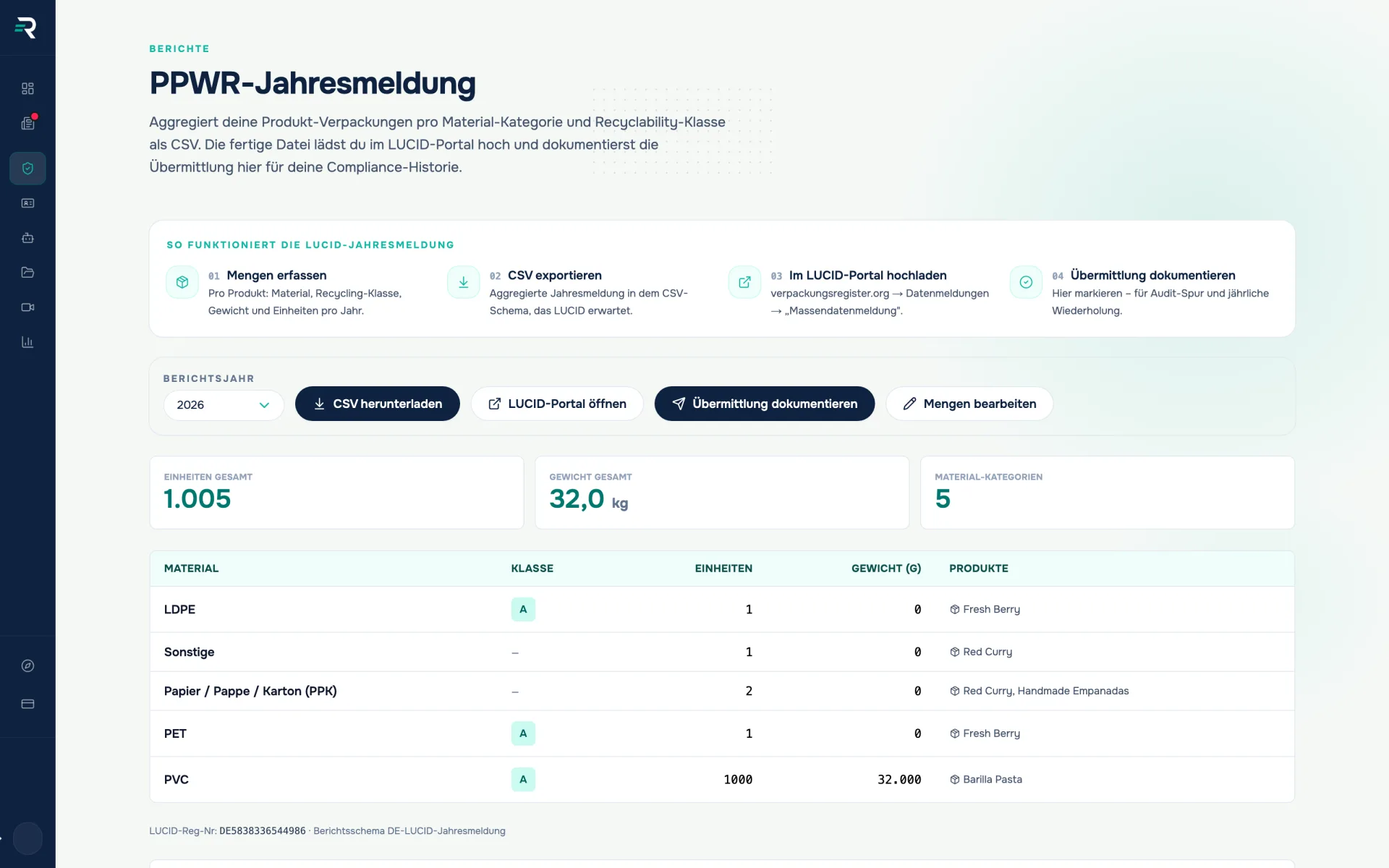
Material, weight and unit count per packaging unit — Reguly turns that into the mass per material type in kg, generates the XML in the ZSVR schema and records when you uploaded it to LUCID.
- Legal basis
- VerpackDG § 9, PPWR Art. 44
- Context
- Extended producer responsibility
- Register
- LUCID (ZSVR)
- Export
- XML report (ZSVR schema 1.0)
Ausgangslage
The reporting is not the work — the volumes are
Registering with the packaging register is a one-off. The volumes behind it are not: they hang off every single packaging unit of every product — material, recyclability class, weight, unit count. Maintain that in spreadsheets and you maintain it again every year.
- The volumes sit in spreadsheets that can no longer be reliably assigned to a reporting year after the fact.
- With many articles the effort grows with every packaging component — each one counts separately.
- In the end there is no proof of when a report went out and which state of the data it was based on.
How you work with it
Volumes come from the products
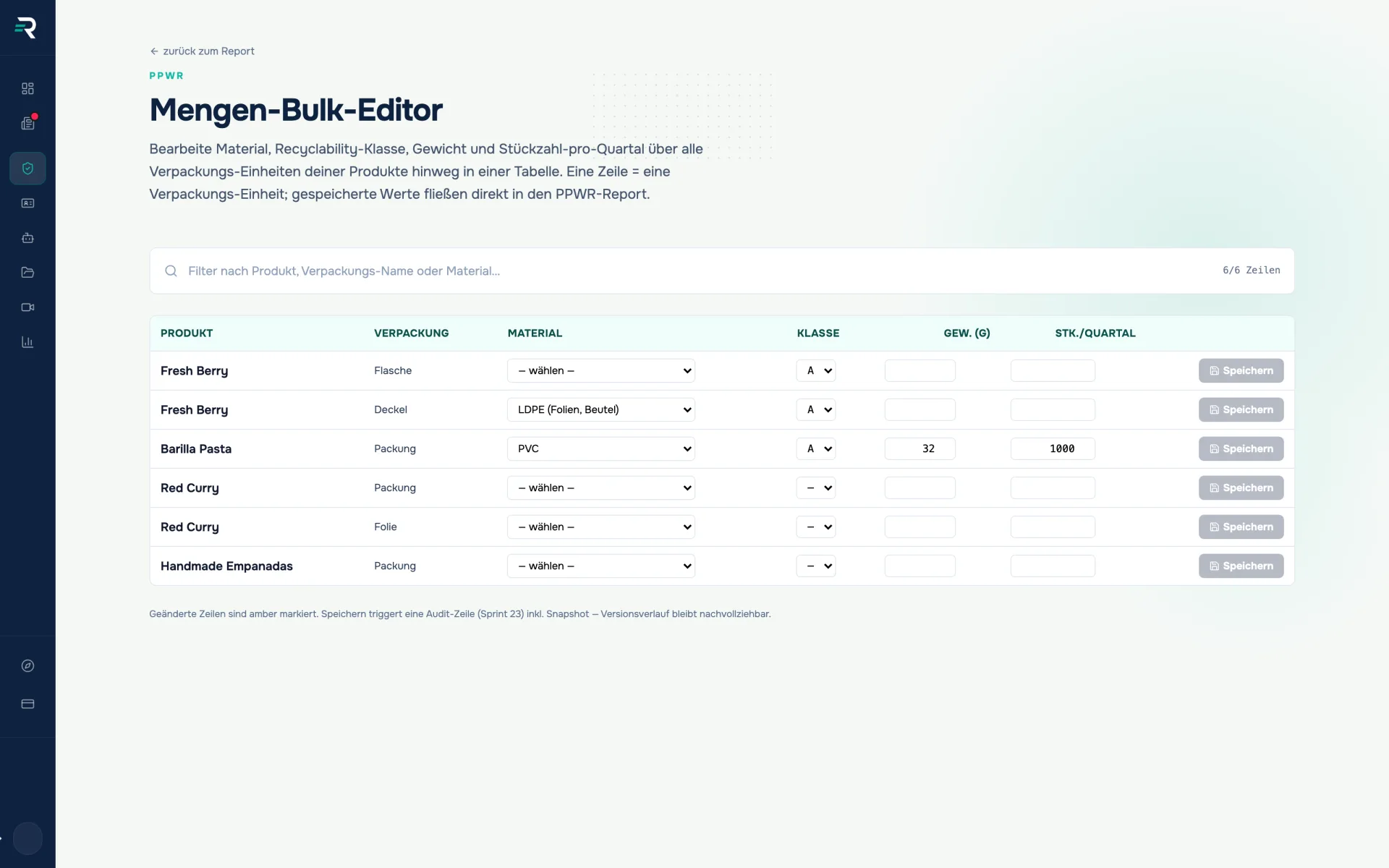
The volume editor shows each product with its packaging units and grams per unit; you enter the units per year. Saving happens row by row, and the value then lives on the product rather than in a side list. Whether a unit is subject to system participation follows a rule per packaging level that you can override per unit.
Reguly calculates, you check
You pick report type and period — year-end, planned volume, intra-year, supplement — and Reguly calculates the mass per LUCID material type (glass, paper/board, ferrous metals, aluminium, plastics, beverage cartons, other composites, other materials) and per system operator in kg with three decimals. If a weight or unit count is missing, Reguly blocks the report and shows where. Reguly does not calculate fees; responsibility for the report stays with you.
Two uploads: dual system and LUCID
Reguly generates the XML file in the ZSVR schema (version 1.0, validated against the official XSD) and shows the same values for entering into your system operator’s customer portal. You upload the XML yourself in your LUCID account under “Data report → XML report”, where you check and confirm the displayed values. Reguly does not submit on your behalf — the law requires you to do this personally (§ 5(1) VerpackDG).
Record the filing
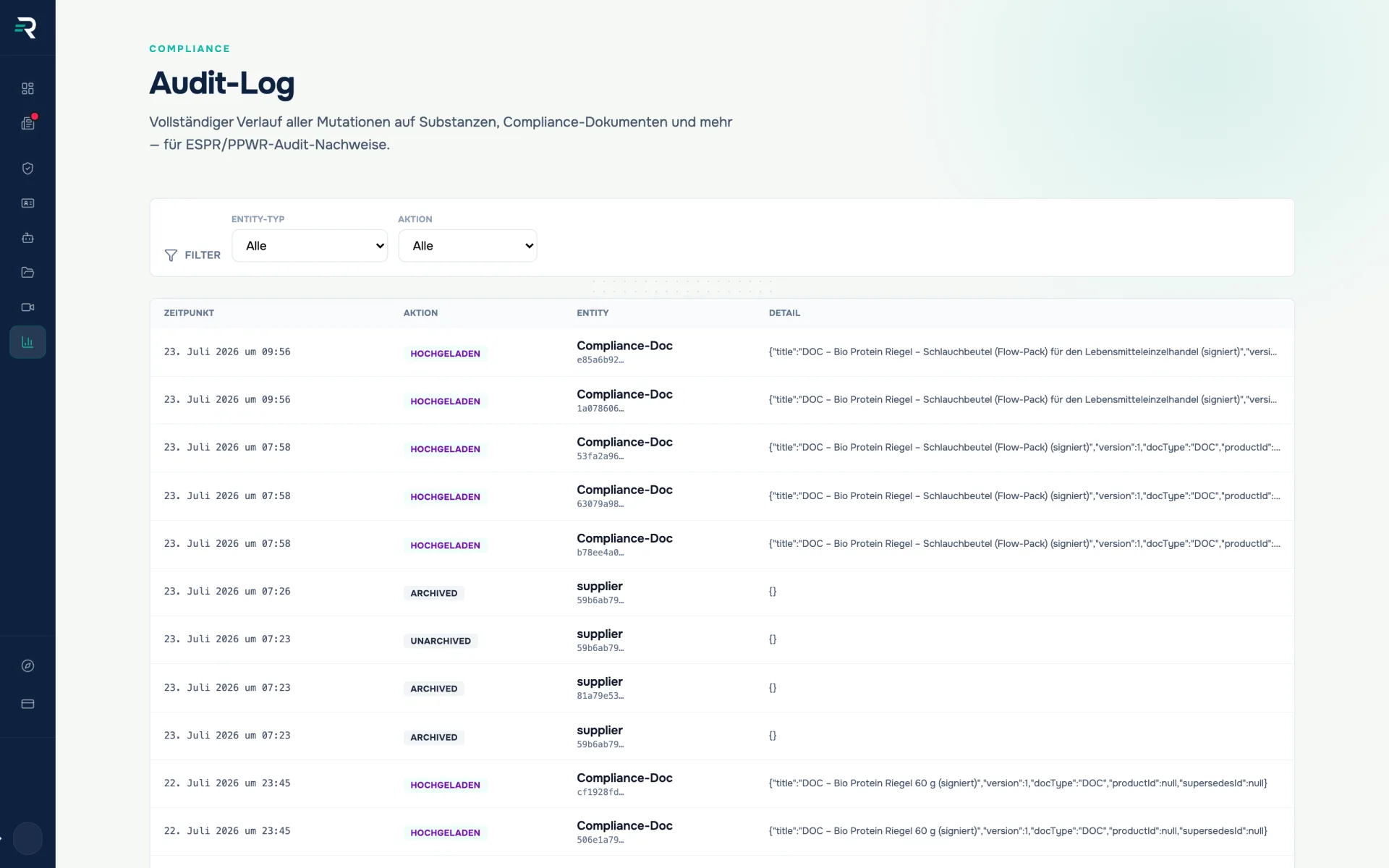
Back in Reguly you tick off the two uploads and close the run; the history carries it with report type, period, mass and the checksum of the XML. If volumes change after 1 June, Reguly prepares the supplement with the difference. Every saved volume change additionally triggers an audit entry.
Der Unterschied
A spreadsheet in purchasing, or aggregation from the master data
Both routes end in a report. The difference is what is still there afterwards.
Spreadsheet in purchasing
- The volumes sit next to the product data. Change a packaging and it has to be maintained in two places — or in one too few.
- Grams or kilograms, PET or “plastics”: everyone does the conversion into LUCID material types themselves, and everyone slightly differently.
- Where a weight in the totals row came from is known only to whoever built the spreadsheet.
Aggregation from the master data
- One row is one packaging unit, stored on the product itself.
- The units are fixed: grams per component, units per year, mass per LUCID material type in kilograms with three decimals.
- Every material row names the products feeding into it — and every change carries its audit entry.
How it fits together
One set of data that carries forward
01
Products & master data
supply the packaging units
Material · Weight · Units per year · System participation
02
Packaging register
converts them and generates the report
Mass per material type · per system operator · XML in the ZSVR schema
03
Audit log
records the change and the submission
Snapshot per volume change · documented filing
Frequently asked questions
Does Reguly report directly to LUCID?
No, and nobody may: under § 5(1) sentence 2 VerpackDG, registration and data reports cannot be delegated to third parties, and the ZSVR offers no write API. Reguly generates the XML file in the ZSVR schema; you upload and confirm it yourself in your LUCID account under “Data report → XML report”. Afterwards you tick off the filing in Reguly.
Does Reguly calculate my EPR fees?
No. The module calculates mass per material type and system operator. Dual system fees, tariffs and penalties are not calculated.
What if I am not registered yet?
Then the module shows a guided registration: capture master data (company name, VAT ID, address, contact person, type of market participant), check the mandatory details, register with LUCID. You then enter the registration number you receive into Reguly.
How often do I have to report?
That depends on your contract with the dual system and on last year’s volume. Whoever placed less than 10 tonnes of packaging subject to system participation on the market in the previous year files only one annual report in LUCID by 1 June (§ 9(2) VerpackDG). Above that, every report to the system must be mirrored in LUCID without delay. Reguly reads last year’s mass from your data and tells you which case applies.
What about the dual system?
You conclude the participation contract with an authorised system yourself. In Reguly you store system operator, reporting cycle and share; the report then shows you the same values you enter in the system’s customer portal — so LUCID and the system receive identical figures.
Is my LUCID number verified?
Yes, against the public register lookup run by the ZSVR. The status reads verified, not listed, rate limit or unavailable.
Passt dazu
Every piece of evidence starts from the same product data.
Maintain products, packaging components, GTIN and images once — the declaration of conformity, the product passport and the volume report all draw their values from it.
Every PCR value with provenance, evidence and expiry date.
Record and evidence PCR shares per packaging component and check them automatically against the minimum targets for 2030 and 2040 — with certificate, supplier and expiry.
Every change is on record before anyone asks about it.
The audit log records every change to your compliance data with timestamp, action and entity — filterable by entity type and action, with a diff per row.
Ready to report?
Five questions show you which PPWR duties apply to you and where your data does not yet hold up — free and without signing up.