

Marketing
One scan and your video plays.
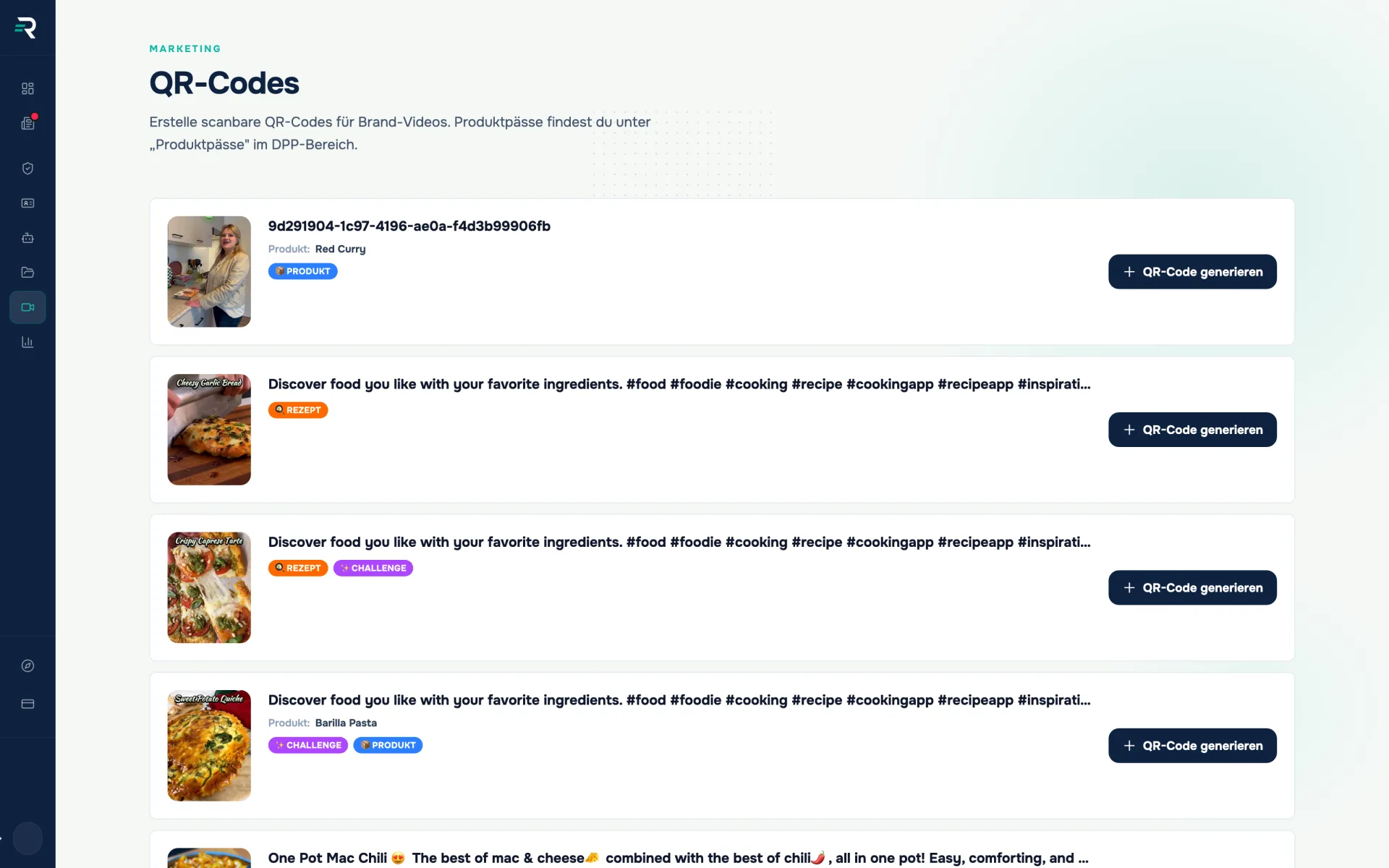
For every brand video you have uploaded, you generate a scannable QR code here and download it as a PNG. QR codes for digital product passports are created separately in the “Product passports” module.
- Area
- Marketing
- Scan target
- Brand video
- Assignment types
- Product, recipe, tutorial
- Output
- QR image as a PNG download
Der Unterschied
From a bare link to a scannable code
Whether a video gets seen at the shelf is decided by the number of steps between interest and playback.
Video without its own code
- The link is too long for a label — and nobody types it in anyway.
- The code is made in a third-party tool, with a third-party redirect attached.
- Which printed code belongs to which video is known only to whoever created it.
With video QR codes in Reguly
- One click per video generates the code and the target link, with nothing in between.
- The code is created where the video lives — the chain stays with you.
- The PNG file name carries the video ID, so the assignment stays traceable on the artwork.
How you work with it
Upload the video and assign it
The basis is created in the content area: upload the video, assign it to a product, recipe or tutorial. The QR module picks that assignment up again and shows it as a badge next to the video — for products with the resolved name rather than a number. It works without an assignment too, for a brand story, say.
Generate the code and download it
One click per row and Reguly generates the code server-side; the preview appears right beside it. The download saves it as a PNG whose file name carries the video ID — so three layout stages later it is still clear which code belongs to which video. Nothing is configurable: no size, no colour, no error correction.
Do not confuse them: product passports have their own codes
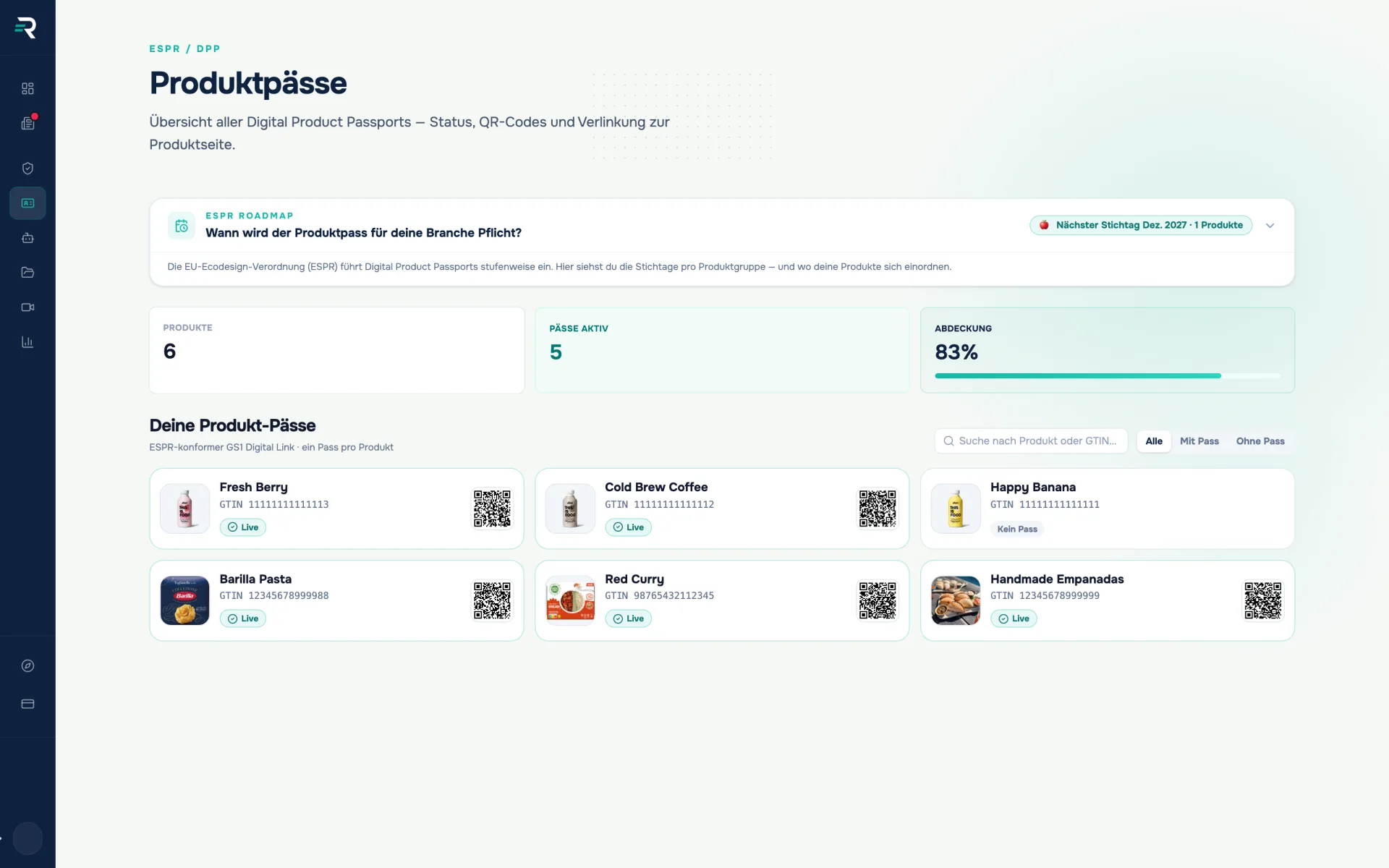
The QR codes for digital product passports are not created here but in the “Product passports” module — there, where a GTIN exists, the code leads to the passport via a GS1 Digital Link. The two complement each other: the passport carries the required information, the video the application. If the packaging only offers one surface, it belongs to the passport as soon as the passport becomes mandatory.
Marketing & brand
You want a video on a piece of packaging, a display or a flyer — without anyone having to type a URL.
Sales & retail
You need a quick code for a product that shows the application instead of describing it.
Agency & design
You produce the artwork and need an image file that drops straight into the layout.
How it fits together
One set of data that carries forward
01
Content
this is where you upload brand videos and assign them to a product, recipe or tutorial
Video · Assignment
02
Video QR codes
generates the scannable code per video and hands it over as a PNG
QR image · Video link
03
Product passports
the separate route: QR codes that lead to the digital product passport
GTIN · GS1 Digital Link
Frequently asked questions
Does this module also generate the QR codes for product passports?
No. Only QR codes for brand videos are created here. The passport QR codes sit in the “Product passports” module, one card per product with GTIN and status; where a GTIN exists, that code leads to the product passport via a GS1 Digital Link.
In which format do I get the code?
As an image file that you save as a PNG via “Download” — the file name carries the video ID. There is no choice between formats such as SVG or PDF, no fixed resolution steps and no ready-made print templates in the module.
Can I set colours, patterns or a logo in the middle?
No. The code is generated without design options, and the error correction level is not selectable either. If your layout demands more, you work on from the PNG in a graphics program — and check the result with a real scan.
Can I see how often a code has been scanned?
Not in this module. A scan count per QR code, broken down by country or device, is not included here.
What happens if I change or delete the video later?
The code points at the video with that ID. There is no way to redirect it to another video afterwards, and no warning before deletion. So settle the content before a code goes to print.
Passt dazu
A QR code that never has to be reprinted.
Product passports shows for every product whether a Digital Product Passport is live, generates the matching QR code and routes every scan to the public product page.
Your public brand page, without a ticket to the agency.
With the website editor you set the colours, fonts, layout and visible sections of your public brand page — with a live preview, without code.
The passport is printed. Is it being opened too?
Analytics shows how often your digital product passports are opened — with a daily curve, top products and a breakdown by country, device and referrer.
Scan once instead of explaining twice
We will show you on one of your videos how assignment, code and target work together — and where the product passport needs a surface of its own.