

Digital Product Passport
Your public brand page, without a ticket to the agency.
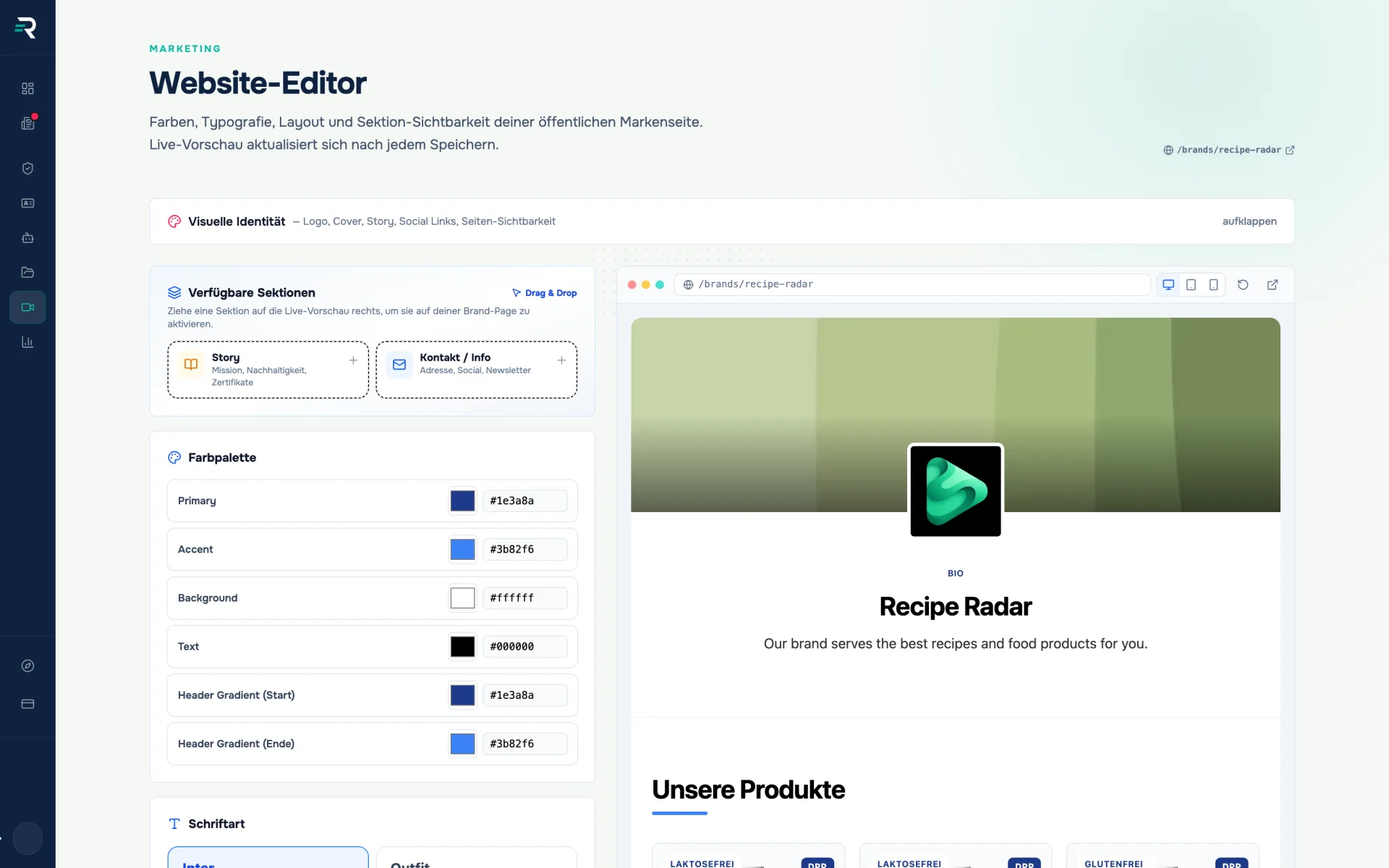
Colours, fonts, layout, order and visibility of the sections are yours to set — next to a live preview that shows every change immediately.
- Module
- Website editor
- Public page
- /brands/<your-brand>
- Layout templates
- 4
- Fonts
- 5
Marketing & brand
You want the look of the public page in your own hands, without waiting for a development slot.
Product management
You decide which products and which product passports are publicly visible — and in what order.
Management
You want the page behind the QR code on the packaging to look like your brand, not like a default template.
Der Unterschied
The same brand page, two routes
The editor changes nothing about the data behind the page — it changes who decides how it looks, and how quickly that happens.
Via ticket and deployment
- Changing a colour or a font means: write a ticket, wait, review.
- Which section sits in which order is decided by the template — not by you.
- How a change looks only becomes visible once it is live.
With the website editor
- Six colour swatches and five fonts — via colour picker or as a hex value.
- Four layout templates, order and visibility per section by drag and drop.
- The preview beside it picks up every change immediately, before you even save.
How you work with it
Set identity and appearance
Logo, cover, story and social links sit in one form. Below them six colour swatches — primary, accent, background, text and the two gradient colours — each with a colour picker and a hex field, so a brand colour is exact rather than approximate. Five fonts are on offer, each tile already set in its own typeface.
Pick a layout and order the sections
Four templates set the basic order — Classic puts the products up front, Magazine the large hero. Hero size and grid density can be overridden independently; wherever you have done so, a dot and a “Reset to template” appear beside it. You order the five sections by handle, hide them via the eye icon and bring them back from the palette. The list can also be operated from the keyboard.
Decide which products are public
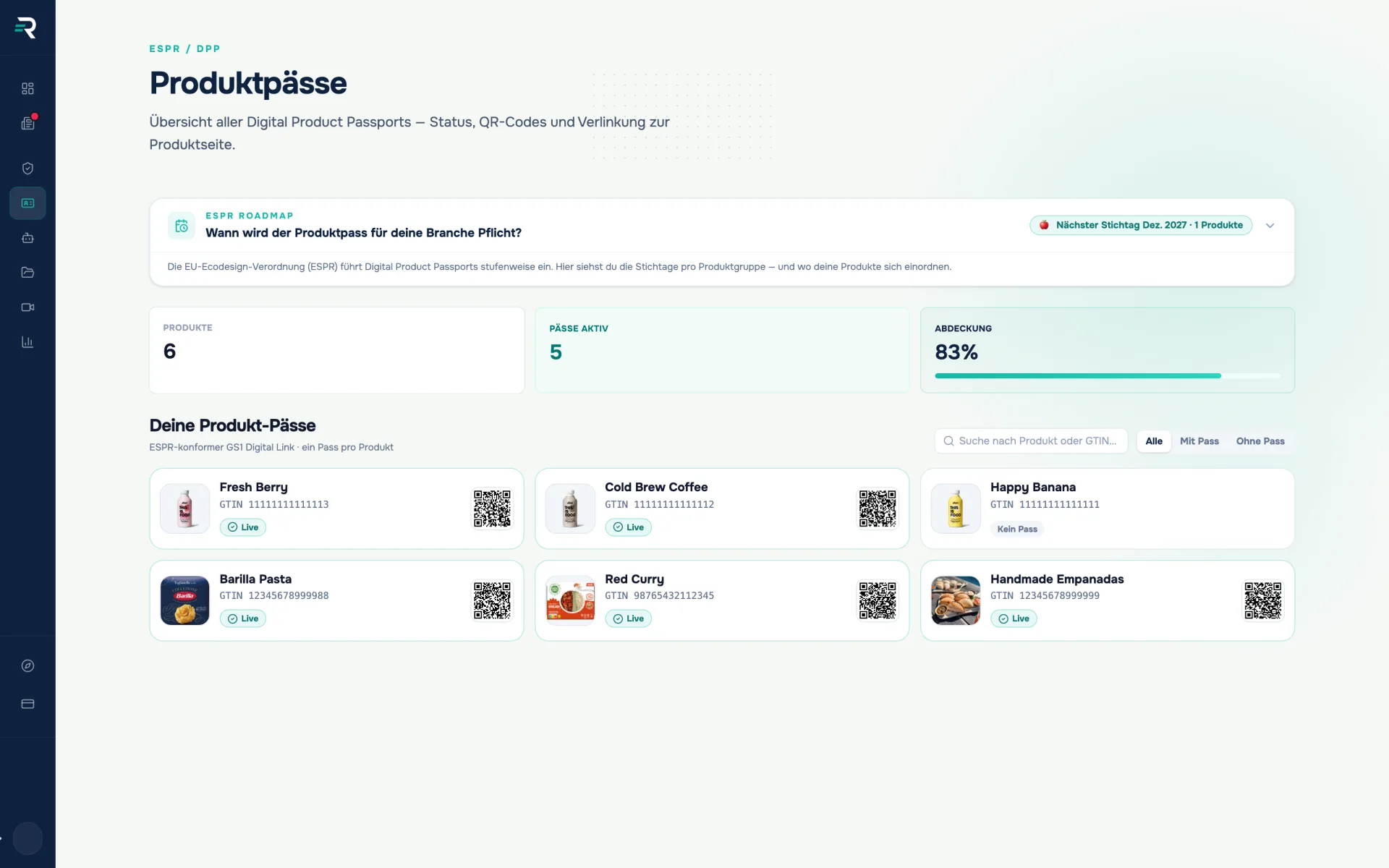
Every product sits in a row with its name and GTIN, plus a tick for “visible” and a handle for the order; above it, the count of how many passports are currently public. That way a discontinued product stays in the system and still disappears from the page. The passports themselves are created in the product passport module — the editor only decides on presentation and selection.
See it live, save automatically
On the right the page sits in a browser frame, switchable between desktop, tablet and mobile; a link opens it without editor mode, exactly as a visitor sees it. Every change lands in the preview immediately — saving happens one and a half seconds after your last entry, with a status indicator and a retry if it fails.
How it fits together
One set of data that carries forward
01
Data hub
brings brand, products and packaging data together
Product master data · Brand profile
02
Product passports
creates the digital product passport with a QR code per product
GS1 Digital Link · QR code
03
Website editor
determines the appearance and the selection of the public brand page
Colours & type · Layout · visible passports
Frequently asked questions
Do I have to press a button to publish?
No. The editor saves automatically one and a half seconds after your last change. While it is still unsaved, the header reads “unsaved”; if you do not want to wait, there is a “Save now” next to it.
Can I insert my own HTML or CSS?
Not in the editor. You work with six colour swatches, five fonts, four layout templates and the overrides for hero size, grid density and section order. Anything beyond that is not a setting in this module.
Can I use my own domain?
The brand page runs under /brands/<your-brand>. There is no step for a custom domain in the editor; the documentation describes it as a route via DNS records at your own provider. Talk to us before you plan around it.
Does Reguly translate my texts automatically?
No. The language switch only toggles the fixed labels of the brand page between German and English. Story, product names and descriptions stay exactly as you maintained them.
What happens to a product I hide?
It disappears from the public page but stays fully in the system. Visibility is a setting of the brand page — not a deletion and not an intervention in the product passport.
Reguly documentation: website editor
Reguly module: website editor (marketing)
Passt dazu
A QR code that never has to be reprinted.
Product passports shows for every product whether a Digital Product Passport is live, generates the matching QR code and routes every scan to the public product page.
Every value knows where it came from.
The data hub brings together all packaging data across sources, shows the completeness rate and makes it traceable where every value came from.
See once how your brand looks in public
We will show you on your own brand how the product passport, the QR code and the public page fit together.